Showing posts with label Nokia. Show all posts

Tuesday, 23 August 2011

Repair any water damage LCD any phone

Some time we are receiving water damage phones with spots in lcd,s or some time getting dead phone and when we finish our job some lcd,s shocking us because of spots so if you have problem like this you can repair lcd spots without changing lcd,s just remove lcd from mobile. now remove its papers layers carefully. some time papers gone totally damage and not clean able then we need to change them from other damage lcd,s.

Enjoy

Tuesday, 9 August 2011

Nokia 1800 Display Solution

Nokia 1680c Local mode solution


Nokia 1680c all solutions


Nokia 1680c *,0,# Solution


Nokia 1661 Sim IC Jumper


Nokia 1616 LCD Ways


Nokia 1616 lcd and keypad light


Nokia 1616 1800 headphone ways


Nokia 1202 UEM changing (Tutorial)


How to check Nokia faults using computer (repairing videos only at gsmcare.net)

Here you will get most usefull information about nokia fault finding with software devices specially UFS and Mxkey.

Let,s start first post nokia 1202 menu, left, star, 0 and # key is not working in this case.
let see how to check and repair this problem.


NOKIA 5610 volume up and down key Solution


c1-01 lcd light jumper


Friday, 24 June 2011

Understand the SIM Card working system on All Cell Phones.

Sample Nokia because its all systems on the basis of his work similar


At pin Simcard must consist of 6 Pin .. consisting of:

simclock
simdata
simreset
VSIM
Ground
Nc (Not Connetcetd)


all phones must be composed of six pins is just ....

Consider the following schematic:


If we look at it ... workflow from the sim card is ....
From the sim connector ===> ====> Simcard Emif Power Ic
This applies to all phones ....

In detail we take the example image below:


This point should we really understand .... because the work will be very decisive steps which we will do ....

PIN2 is important that we have noticed is all the PIN2 must be in a state connected to each other according to the path ... except for NC path alias not connected or not connect to mana2


STEP 2 simcard in determining damages is ....

1. Simcard replace first ... lest we not read sim card mobile phone sim card because it is damaged ... oon's really tuh hehehheheh
2. If the sim is ok ... measuring inhibition of 5 pins in it ... VSIM particular point, the data sim, sim sim clock and reset ....

PIN2 is to determine where on the connector ... the steps we need to do is to determine which point PIN2 Ground on the sim card connector ....

You have to understand ... that the ground would be in one corner of the sixth PIN2 .. as shown below:


If you notice ... then the ground of the sim card connectors are located on the bottom right corner ...

to determine the next titik2 ....

that is certain!!
ground position to deal with VSIM
On the ground must have NC
His next composition of the next sequence certainly like the picture above ....


Well,.,, After we know titik2 of PIN2 in accordance with its name ... then the next step is ... by measuring the resistance in the pin data, clock, reset and VSIM ....

if there are no obstacles in the climb, ... hence can be sure that your cell phone damage is a line break between emif simcard with connectors or damage to the emif simcard ....

steps you should do is ... by lifting emif sim card ... then measure the correlation between the broken lines in accordance track down emif sim ...

if the line is not severed was good aka .. hence can be sure that ... emif simcard must BROKEN! solution is to replace or men jumper emif emif simcard simcard in accordance with the track ... for example at the above phone .. jumper the trick is as follows:


The next ......
if it turns out after doing resistance measurements in the ... all the normal barriers .. (If necessary, compare with the value at normal cell phone)
then ... steps should be done is by measuring the voltage on the connector .... VSIM measuring at the measuring point in accordance with the determination of this VSIM pin ...

VSIM measurements should be made on the phone the first time in the light ... Why? because when the phone is the first time live ... then he will check the existence of sim and will appear voltage of 1.8 v. .. if the mobile phone sim card does not detect the presence of the tension that had been at 1.8v will fall directly on the point of ZERO ... but if the phone can detect the card then the voltage will be increased to 3 volts ...

so do not be surprised .. if the phone had been living so many seconds ... you will not be able to measure the presence of voltage at 1.8v the sim card ... this is what often happens and becomes kekeliaruan .. and always raises the question ... "Kok kok VSIM voltage measurement his breast I not ever stress ya ????"

hehhehehhhe

more ... if after doing measurements proved that the voltage stress is apparently no voltage NOL aka ... then it should do that best is to replace the Power Ic .. because the stress is coming from the UEM ... but .. replace the IC power because it has a big risk .... and also requires a high cost due to power ic pretty good price ... then ... the stress is enough to outsmart us by fetching from another voltage ...


Whether the voltage from which we'd better get me??

you do not take away from the stress of other 1.8v .. example taken from Fio ... because the possibility of success will be very small ....

Why?

because when simcar unreadable ... there must be a voltage of 3 volts instead 1.8v ....
8.1 The stress voltage is the basis for detecting the presence of sim ...

The most appropriate is ... by making jumpers from 3-volt voltage for others ....

nah on the phone because we very rarely voltage 3 volts .. then we usually menjumper of voltage at 2.8v .. example of the Vaux voltage of 2.8v .....
this forum actually do have a jumper from Vbat .... and successful ...
it is okay to do .. and will be successful .. but because there is excess voltage that should only 3 volts (VSIM) to Vbat (3.7V) .. hence the risk it faces is the possibility of rapid destruction of our CIP sim card ....


The next step ....


if we measure it on the path constraints VSIM not normal .. aka height .. then we have to do is to disconnect the capacitor on the path that led to ground .. because damage to the capacitor on the line can be caused sim unreadable ...

Here are disposed capasitor2:

Note the capacitor which given a yellow color ....


capasitor2 unplug serve targeted if the obstacle in the path simcard problem ....

Next ........

If we measure it all turned out normal barriers ... The next step is to lift emif sim ... then measure the resistance in between emif Power Ic simcard that led to the one in emif ... the goal is to find out .. whether between emif simcard and power ic .... there is a line break

if there is no increased resistance value .. hence can be sure that there is line break between emif and power ic .. then the solution is to jumper between emif simcard into power ic in accordance with the broken lines ...


If after performing the measurement .. apparently all the normal barriers .. then jumper simcard emif first ... if after to jumper emif simcar normal direct phone .. hence can be sure the damage to emif ....


but if it turns out after to jumper emif ... no sim card also read ... hence can be sure damage to the power ic ....


Monday, 9 May 2011

Nokia 6500S auto off at startup solution

Hi, friends here is the method of repairing nokia bb5 phones auto off atstartup.

Q = why this problem comes in bb5 phones mostly?

Ans = because in mostly cases we used or someone used lower version of firmware or cpu is faulty.

Solution = First full flash phone with latest firmware after full rpl and pm backup try to downgrade fix with mxkey  go to Nokia service tool > service tab > quick fix > tick bb5 sw downgrade fix > do selected job.

see log below.


Using device: UFS_USB V2.8 (c) SarasSoft 2007.
Library version: 1.0.0.9274(01-03-2011), 1.0.0.15761(01-03-2011)
CMT Data :
SYSTEM ASIC ID: 000000010000022600010006010C192101003000 [RAP3G ver: PA 3.0]
EM0 ID: 00000295
EM1 ID: 00000B22
PUBLIC ID: 06500117CC137D56556B24999D2261F4E01F38D6
ASIC MODE ID: 00
ROOT KEY HASH: BAF3A9C3DBFA8454937DB77F2B8852B1
ROM ID: 273F6D55DFAAF68F
 SecondaryBoot: rap3gv3_2nd.fg [BB5]  version: 1.30.0 revision: 0.0 size: 0x3C00
 Supported Ids: 0103192101003000, 010C192101003000, 0103192101013000, 010C192101013000, 0103192101003100, 010C192101003100, 0303192101023000, 030C192101023000, 0303192101033000, 030C192101033000, 0103192101001101, 010C192101001101, 0003192101001002, 000C192101001002, 0013192101001002, 001C192101001002
FlashID0: 0001 003F  - 0000 8A21 [AMD 72NS512PD,512 Mbits] type: NOR,CMT
ExtBUSC: 0000 0000 0000 0000 0000 0000 0000 0000
TransmissionMode: 16Bit
 Algorithm: RAP3Gv3_algo.fg [BB5 ALGORITHM]  version: 1.40.0 revision: 0.0 size: 0x22C10
 Supported Ids: 0103192101003000, 010C192101003000, 0103192101013000, 010C192101013000, 0103192101003100, 010C192101003100, 0303192101023000, 030C192101023000, 0303192101033000, 030C192101033000, 0003192101002000, 000C192101002000, 0003192101002100, 000C192101002100, 0003192101002200, 000C192101002200, 0003192101012200, 000C192101012200, 0103192101001101, 010C192101001101, 0003192101001002, 000C192101001002, 0013192101001002, 001C192101001002
CMT PAPUBKEYS HASH: A69838E8C5F20150E64E2E6E06DE6E50B26B593F
TransmissionMode: DDR&TX2
Processing MCU file: rm240__03.80.mcusw
 [BB5,BB5 ALGORITHM]  size: 19.84 MB
 Supported Ids: 0103192101003000, 010C192101003000
Erase size: 21.12 MB
CMT NOR area [00000000-0001FFFF]
CMT NOR area [00040000-000BFFFF]
CMT NOR area [000C0000-0013FFFF]
CMT NOR area [013C0000-0153FFFF]
CMT NOR area [00140000-013BFFFF]
erased in 1 min 17.188 sFlash programming ...
CMT PAPUBKEYS: A69838E8C5F20150E64E2E6E06DE6E50B26B593F (RAP Certificate 84 v1) written.
Programming completed in 2 min 4.266 s
Processing PPM file: rm240__03.80.ppm_m1
 [BB5,BB5 ALGORITHM]  size: 4.51 MB
 Supported Ids: 0103192101003000, 010C192101003000
Erase size: 6.50 MB
CMT NOR area [01540000-01BBFFFF]
erased in 24.703 sFlash programming ...
Programming completed in 28.266 s
Processing CNT file: rm240__03.80_ism_006.image_m1_SWAP
 [BB5,BB5 ALGORITHM] page size: 128 K size: 10.76 MB
 Supported Ids: 0103192101003000, 010C192101003000
Erase size: 35.87 MB
CMT NOR area [01EC0000-03F9FFFF]
CMT NOR area [01BC0000-01EBFFFF]
erased in 2 min 29.953 sFlash programming ...
Programming completed in 1 min 7.078 s
Total time for flashing process(boot+erase+write) was 7 min 59.000 s


Using device: UFS_USB V2.8 (c) SarasSoft 2007.
Library version: 1.0.0.9274(01-03-2011), 1.0.0.15761(01-03-2011)
CMT Data :
SYSTEM ASIC ID: 000000010000022600010006010C192101003000 [RAP3G ver: PA 3.0]
EM0 ID: 00000295
EM1 ID: 00000B22
PUBLIC ID: 06500117CC137D56556B24999D2261F4E01F38D6
ASIC MODE ID: 00
ROOT KEY HASH: BAF3A9C3DBFA8454937DB77F2B8852B1
ROM ID: 273F6D55DFAAF68F
 SecondaryBoot: rap3gv3_2nd.fg [BB5]  version: 1.30.0 revision: 0.0 size: 0x3C00
 Supported Ids: 0103192101003000, 010C192101003000, 0103192101013000, 010C192101013000, 0103192101003100, 010C192101003100, 0303192101023000, 030C192101023000, 0303192101033000, 030C192101033000, 0103192101001101, 010C192101001101, 0003192101001002, 000C192101001002, 0013192101001002, 001C192101001002
FlashID0: 0001 003F  - 0000 8A21 [AMD 72NS512PD,512 Mbits] type: NOR,CMT
ExtBUSC: 0000 0000 0000 0000 0000 0000 0000 0000
TransmissionMode: 16Bit
 Algorithm: RAP3Gv3_algo.fg [BB5 ALGORITHM]  version: 1.40.0 revision: 0.0 size: 0x22C10
 Supported Ids: 0103192101003000, 010C192101003000, 0103192101013000, 010C192101013000, 0103192101003100, 010C192101003100, 0303192101023000, 030C192101023000, 0303192101033000, 030C192101033000, 0003192101002000, 000C192101002000, 0003192101002100, 000C192101002100, 0003192101002200, 000C192101002200, 0003192101012200, 000C192101012200, 0103192101001101, 010C192101001101, 0003192101001002, 000C192101001002, 0013192101001002, 001C192101001002
CMT PAPUBKEYS HASH: A69838E8C5F20150E64E2E6E06DE6E50B26B593F
TransmissionMode: DDR&TX2
Reading CMT NPC  (0x168 bytes)
Imei: 3568540xxxxxxx
NPC_DATA saved OK
RPL saved to "C:\mobileEx\3.4\data\backup\RPL\3568540xxxxxx_NPC.rpl"
Erasing CMT  NPC ... OK

Applying BB5 SW Downgrade patch ...
Reading signatures ...OK.
PM backup saved to "C:\mobileEx\3.4\data\backup\3568540xxxxxxx_20110508100002_308.1.PM"
BB5 SW Downgrade patch OK.

CMT Data :
SYSTEM ASIC ID: 000000010000022600010006010C192101003000 [RAP3G ver: PA 3.0]
EM0 ID: 00000295
EM1 ID: 00000B22
PUBLIC ID: 06500117CC137D56556B24999D2261F4E01F38D6
ASIC MODE ID: 00
ROOT KEY HASH: BAF3A9C3DBFA8454937DB77F2B8852B1
ROM ID: 273F6D55DFAAF68F
 SecondaryBoot: rap3gv3_2nd.fg [BB5]  version: 1.30.0 revision: 0.0 size: 0x3C00
 Supported Ids: 0103192101003000, 010C192101003000, 0103192101013000, 010C192101013000, 0103192101003100, 010C192101003100, 0303192101023000, 030C192101023000, 0303192101033000, 030C192101033000, 0103192101001101, 010C192101001101, 0003192101001002, 000C192101001002, 0013192101001002, 001C192101001002
FlashID0: 0001 003F  - 0000 8A21 [AMD 72NS512PD,512 Mbits] type: NOR,CMT
ExtBUSC: 0000 0000 0000 0000 0000 0000 0000 0000
TransmissionMode: 16Bit
 Algorithm: RAP3Gv3_algo.fg [BB5 ALGORITHM]  version: 1.40.0 revision: 0.0 size: 0x22C10
 Supported Ids: 0103192101003000, 010C192101003000, 0103192101013000, 010C192101013000, 0103192101003100, 010C192101003100, 0303192101023000, 030C192101023000, 0303192101033000, 030C192101033000, 0003192101002000, 000C192101002000, 0003192101002100, 000C192101002100, 0003192101002200, 000C192101002200, 0003192101012200, 000C192101012200, 0103192101001101, 010C192101001101, 0003192101001002, 000C192101001002, 0013192101001002, 001C192101001002
CMT PAPUBKEYS HASH: A69838E8C5F20150E64E2E6E06DE6E50B26B593F
TransmissionMode: DDR&TX2
Updating CMT  NPC ...OK

Phone Type: RM-240 (Nokia 6500s-1)
SW Version: V 03.80 10-09-07 RM-240 (c) Nokia            
Imei plain: 3568540xxxxxxxx
Product Code: 0557556
Language Pack:
- not available.

SIMLOCK seems to be valid
SUPERDONGLE_KEY seems to be valid
CMLA_KEY seems to be valid
WMDRM_PD seems to be valid
SIMLOCK_TEST passed
SECURITY_TEST passed


Imei net: 3568540xxxxxxxx
Version: SIMLOCK SERVER
Counter: 0/3, 0/10

CONFIG_DATA: 2440700000000000
PROFILE_BITS: 8000000000000002

BLOCK 1:   1=OPEN 2=OPEN 3=OPEN 4=OPEN 5=OPEN, DATA=FFFFFF
BLOCK 2:   1=OPEN 2=OPEN 3=OPEN 4=OPEN 5=OPEN, DATA=FFFFFF
BLOCK 3:   1=OPEN 2=OPEN 3=OPEN 4=OPEN 5=OPEN, DATA=FFFFFF
BLOCK 4:   1=OPEN 2=OPEN 3=OPEN 4=OPEN 5=OPEN, DATA=FFFFFF
BLOCK 5:   1=OPEN 2=OPEN 3=OPEN 4=OPEN 5=OPEN, DATA=FFFFFF
BLOCK 6:   1=OPEN 2=OPEN 3=OPEN 4=OPEN 5=OPEN, DATA=FFFFFF
BLOCK 7:   1=OPEN 2=OPEN 3=OPEN 4=OPEN 5=OPEN, DATA=FFFFFF
FULL FACTORY... OK
USER DATA... OK
LEAVE FACTORY... OK
SERVICE CENTER... OK
SOFTWARE UPGRADE... OK
PRODUCTION TUNING... OK
Reset User Code (to default:12345) ... OK
Completed in 1.890 s


Enjoy!

Friday, 8 April 2011

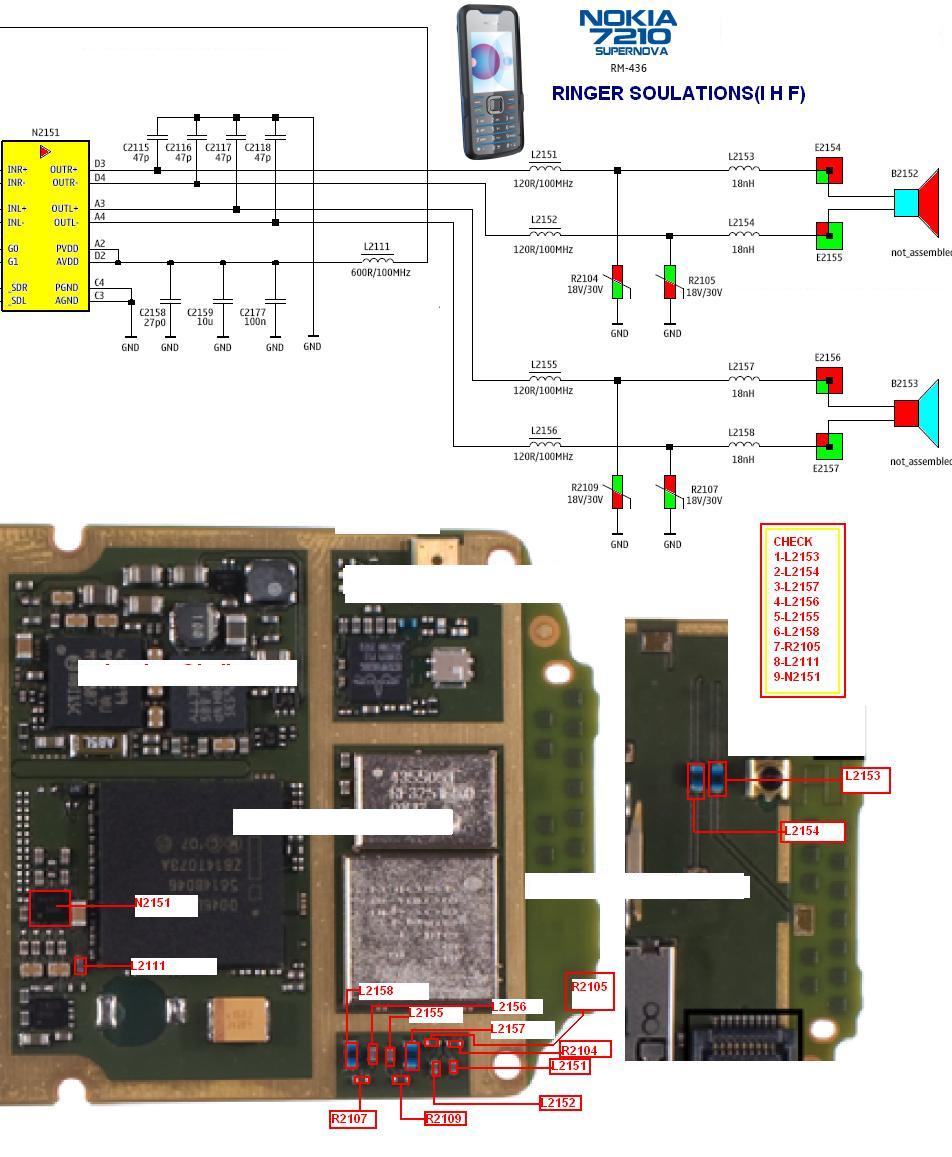
7310 Ringer ways

7210 7310c ringer solution and tracks.


Please post comments to improove my work and also learn how to work.
Bookmark this page for more useful stuff. CTRL+D
always check Archives on the side bar for old posts.